

Summary
Torrance Learning hosted the xAPI Learning Cohort – Fall 2016, and I was so happy to be able to participate! It’s been exciting to meet others who are interested in xAPI, and to work with them to learn more about this emerging technology. I joined a team interested in using xAPI to measure not only learning, but also performance. Our eventual goal is to be able to tie learning to performance, to show a return on investment.
Sample Case
For our example, we settled on training sales representatives to use a spreadsheet with sales data to determine their most important customers.
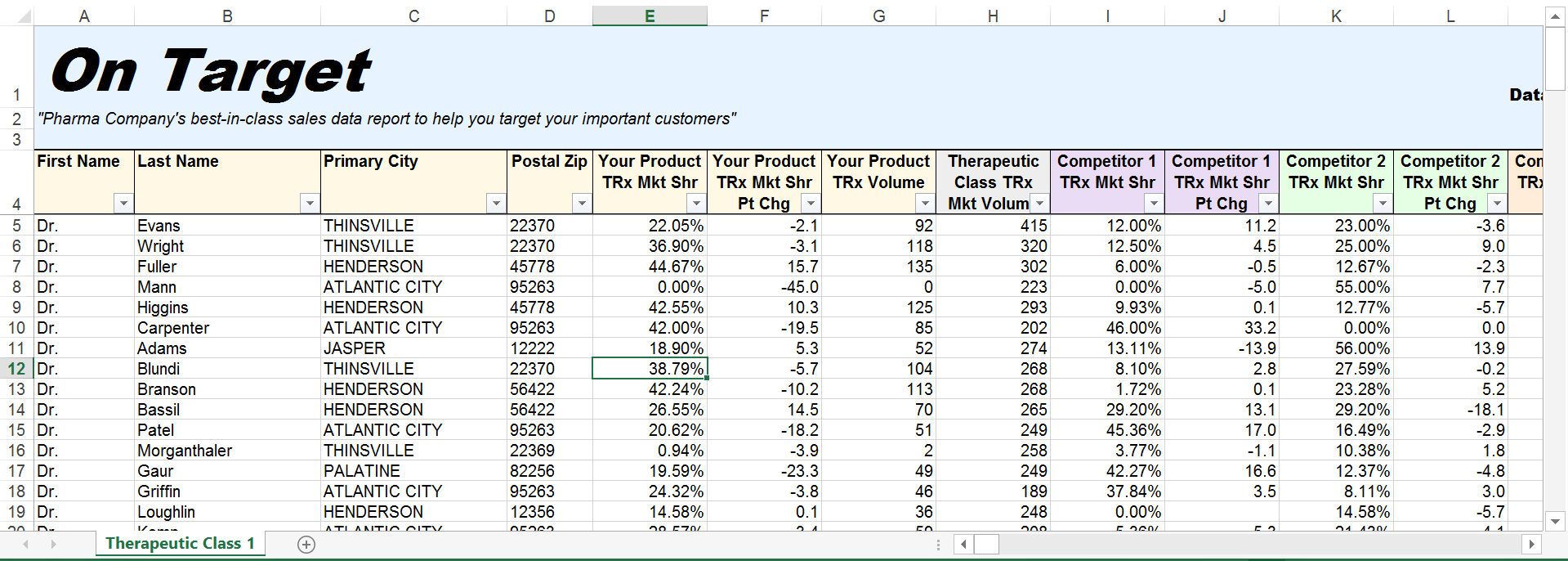
We developed training on how to sort and filter to find important customers. We knew we could create xAPI statements from this training, even without coding, with several elearning authoring tools that can publish to xAPI.
The sticking point we found was how to measure the performance of employees who open the file in Microsoft Excel and attempt to locate important customers. We considered the idea of using Visual Basic for Applications (VBA) and coding the xAPI statements needed for the performance we wanted to measure. But, no one in our group is familiar with VBA
We heard that Zapier can produce xAPI statements from a Google Sheet, and planned to move our Excel content to Google Sheets to take advantage of this tool. As of November 2016, however, Zapier can only produce xAPI statement for these four Google Sheets actions:
- Update Spreadsheet Row: Update a row in a specific spreadsheet.
- Create Spreadsheet Row: Create a new row in a specific spreadsheet.
- Create Spreadsheet Row(s): Create one or more new rows in a specific spreadsheet (with line item support).
- Lookup Spreadsheet Row: Finds a row by a column and value. Returns the entire row if one is found.
Honestly, we were hoping for something more. We were hoping we could track the various actions our employees might take, for example:
- To find important customers, did employees sort, filter or both?
- Did employees use one particular column of data more than others?
- Did employees follow the steps they learning during training? Or are they using other metrics to identify their important customers?
Conclusion and Next Steps
Although we know how to create elearning that produces xAPI statements even without coding, we haven’t found many tools yet that can easily produce useful xAPI performance data without coding. Using xAPI to track important metrics from our training is a great leap forward from SCORM. But, I believe that xAPI implementations will not become mainstream at many organizations until it is also possible to measure performance easily with xAPI.
If a training manager understands the benefits of xAPI, then in order to secure funding to implement xAPI, she/he will, almost certainly, need to show upper managment a proof of concept. How can we create these test cases if many of us don’t know how to code? How likely will the CEO or CFO be to approve the budget needed to switch to xAPI if there is no way to easily measure return on their investment? It would be great if I could set aside the time to learn to code. But, finding that time would be difficult for most of us in the field of learning and development.
As we wrap up this Fall’s xAPI Learning Cohort, Our Corporate Learning & Performance Outcomes team has decided we’ll sign up for the Spring 2017 Cohort, to continue our quest to tie learning to performance with xAPI.
Special Thanks
To Alex Sergay and Chris King, who worked with me each week to develop and test our idea.
To Watershed LRS and Andrew Downes, who worked with us to set up a test LRS and tie in our training content.
 @SaraSWalters